
IoT installation services are the on-site work that puts connected devices into service:
- Site survey
- Power and cabling
- Mounting
- Network setup
- Provisioning
- Secure configuration
- Commissioning
- Closeout records
Kinettix is a global IT field services provider that does this work for cameras, access readers, sensors, and gateways; including remote engineering support for over 800 camera installs in 5 weeks, at a pace of 20 to 25 sites a day.
Install quality shows up in the research: in Eseye's 2025 State of IoT survey of 1,200 US and UK decision makers, 76% agreed that a hardware blind spot is undermining IoT project success, and 66% said devices fail to connect regularly or always because of a hardware issue. Eseye sells IoT hardware and connectivity, and its survey covered cellular-connected devices, so read it as a signal rather than a benchmark.
In this guide, IoT means three device families:
- Physical security hardware (cameras and access control)
- Sensors (environmental, asset, and occupancy)
- The gateways that connect them
This article walks through the eight tasks in an IoT installation, who owns what between installer and integrator, a seven-step project flow, and the readiness checks technicians run at every site.
8 Tasks Covered by IoT Installation Services, From Site Survey to Live Data

From the first site assessment to the first transfer of data across devices, everything along that process is under the purview of your IoT installer.
Eseye SVP Anand Gandhi said an IoT deployment is "only as strong as its weakest link," and that for three-quarters of businesses the weak link is the hardware. Eseye measures device design and connectivity. The on-site part of that chain, placement, power, and commissioning, is where an installation partner controls the outcome.
- Site survey & readiness audit
A survey confirms network connectivity, power, mounting surfaces, and cable pathways before hardware ships, so surprises show up on paper instead of on install day. Kinettix ran Ekahau predictive surveys at 150 to 200 sites for a U.S. bank to size the Cisco access point count and pick mounting locations ahead of the install visit.
- Power & cabling (outlets, PoE, low-voltage runs)
Every device needs a power source or PoE capacity at its exact location and a cable path that reaches it. Battery-powered sensors skip the cable but still need a check of the signal path between the device and its gateway.
- Mounting & physical placement
Placement decides what a camera sees, what a sensor measures, and how clearly a gateway hears the devices around it. Technicians match the mounting method to the surface and finish each install with clean cable management and clear labeling. For camera-specific placement targets, see our CCTV camera setup guide.
- Network & connectivity setup (Wi-Fi, Ethernet, cellular, BLE, LoRaWAN)
Each connectivity type has its own site requirements, from open switch ports for Ethernet to signal strength for cellular and LoRaWAN. Technicians confirm those conditions and work from the VLAN and firewall rules your IT team provides.
- Device provisioning & activation
Provisioning ties each device to its record in the device management platform so it reports under the right site and name. Staging devices before they ship moves that work into a controlled setting and shortens the visit.
- Secure configuration & credential handoff
Technicians change default credentials, place devices on the approved network segment, and hand credentials to the right owner. Forescout's 2026 report ranks network video recorders fourth among the riskiest IoT device types, which makes install-time hardening a security task.
- Commissioning & data validation
Commissioning proves the device is powered, connected, positioned correctly, and sending data the platform accepts. On the camera project covered below, remote engineers ran three checks on each install: mounting location, camera function, and cloud configuration.
- Documentation, handoff & break/fix coverage
The closeout package lists what was installed, where, how it was verified, and which exceptions remain, and a break/fix path covers devices that fail later. A September 2026 GAO report lists the eight categories of information OMB requires for each networked device, including software and firmware versions and security controls, and the same list works as a benchmark for any handoff package.
Installer vs. Integrator: Who Owns Which Part of an IoT Project?
Installation and integration sound similar but own different parts of an IoT project. Installation is the physical work: survey, power, cabling, mounting, staging, and break/fix. Integration is the digital work: gateway-to-cloud configuration, the data pipeline, dashboards and analytics, and ERP or CRM connections.
|
Project Task |
Installation Partner |
IoT Integrator |
Platform Vendor |
Your IT Team |
|
Site survey & readiness |
Lead |
Support |
Input |
Input |
|
Power, cabling & mounting |
Lead |
n/a |
n/a |
Input (site access) |
|
Device staging & provisioning |
Lead |
Support |
Input (tooling) |
Input (approved devices) |
|
Local network & connectivity |
Lead |
Support |
n/a |
Input (VLAN, firewall rules) |
|
Gateway-to-cloud configuration |
Support |
Lead |
Input |
Input |
|
Data pipeline, dashboards & analytics |
n/a |
Lead |
Support |
Input |
|
ERP/CRM & application integration |
n/a |
Lead |
Support |
Input |
|
Security policy & access approval |
Support |
Input |
Input |
Lead |
|
On-site break/fix & device swaps |
Lead |
n/a |
Input (RMAs) |
Input (escalation) |
Microsoft's 2021 IoT Signals survey found that only 38% of decision makers and developers build and implement IoT solutions entirely in-house, so most projects involve outside help for at least part of the work.
The installation partner leads every task that needs a person at the site, and the integrator leads everything that happens after data leaves the gateway. Security policy and access approval stay with your IT team, so settle those two items before a technician is scheduled.
How Does an IoT Installation Project Run From First Survey to Final Handoff?
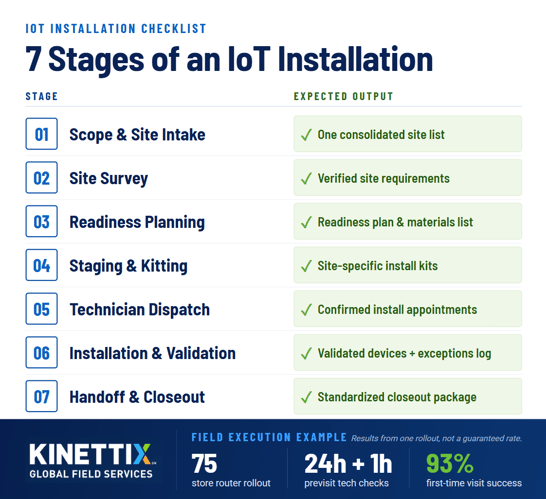
Kinettix runs the same seven steps at every site, so site fifty is surveyed, installed, and documented the same way as site one.
- Scope & site list intake
The project starts with the site list, device counts and models, and any access or timing limits. One clean list lets scheduling, shipping, and technician matching run from the same source.
- Remote or on-site survey
A remote review works when site photos, floor plans, and IT answers settle the open questions, and an on-site survey covers the rest. Either path ends with a verified list of what each site can support.
- Readiness plan & materials list
Survey findings become a per-site plan for switch capacity, power, cable, mounts, and any second visit. The materials list keeps a missing bracket from being discovered at the door.
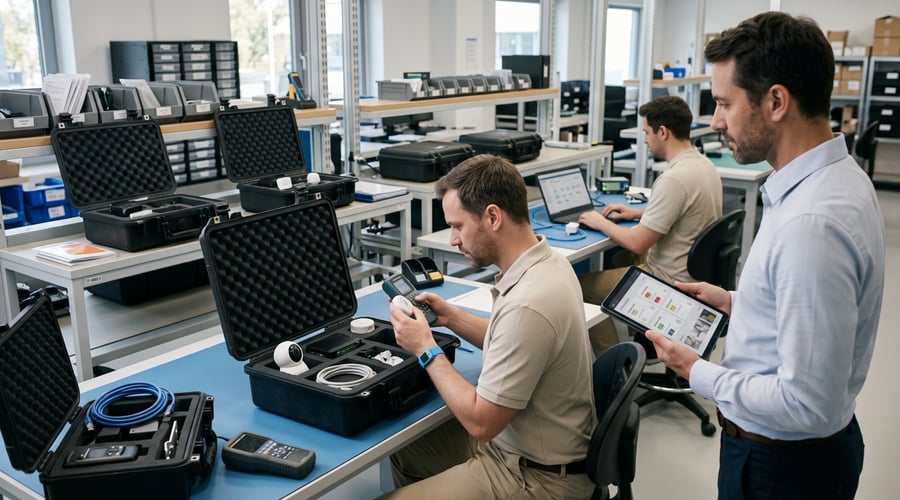
- Staging, kitting & shipping
Devices are staged, kitted by site, and labeled before they ship, so a technician opens one kit per location. Pre-configuration happens here when the platform supports it.
- Technician dispatch & scheduling
On a WAN circuit and router rollout across 75 stores, Kinettix made check calls 24 hours and 1 hour before each visit to confirm the technician was still on schedule. The project finished with a 93% first-time visit success rate.
- Install, commission & validate
The technician runs the readiness checks, mounts and connects each device, and confirms it reports correctly. A failed check, such as no open switch port, is logged as an exception on the spot instead of being absorbed into an inconsistent install.
- Handoff, documentation & closeout reporting
Each site closes with photos, device records, validation results, and open exceptions in one package. Standard closeout records let your team compare sites and plan the next wave from evidence.
6 Reasons Why IoT Rollouts Stall at the Last Mile
In GSMA Intelligence's 2024 survey of 4,200 enterprises across 21 countries, cost of implementation (39%), security vulnerabilities, and complex technology integration were the top IoT deployment challenges. Here is what we check for at every site:
- Switch ports & PoE that can't support the devices
A site can have a live network and still lack the open ports or PoE budget for ten more cameras. Learning that on install day turns a one-visit job into a reschedule.
- Mounting surfaces & cable pathways nobody checked
Glass, old plaster, drop ceilings, and full conduit all change how a device mounts and how a cable reaches it. A path that looks simple on a floor plan can be blocked above the ceiling.
- Coverage guessed instead of surveyed
Wireless and sensor signal depends on walls, shelving, and equipment that a floor plan does not show. A predictive survey before the visit, like the Ekahau surveys in task 1, settles access point and gateway placement on paper.
- Delays at the door (escorts, entry procedures, access windows)
A missing escort or an unannounced entry rule can end a visit before it starts. Kinettix confirms site access and logistics before dispatch so work begins on schedule.
- Site-to-site variation in methods & documentation
When each site follows its own method, quality drifts and comparing sites becomes guesswork. One work package, one checklist, and one closeout format keep results uniform.
- No response path when a device fails after install
Devices fail after the installer leaves, and without a dispatch path the site waits while someone hunts for a technician. Break/fix coverage tied to the original install records shortens that wait.
Last-Mile Readiness Checklist
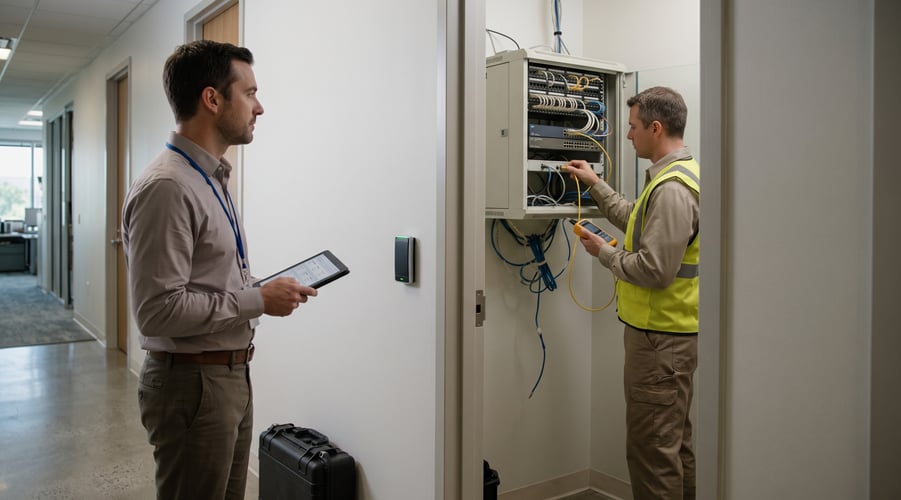
Before a technician mounts anything, they run the same five checks at every site. When a check fails, the technician logs a named exception and routes follow-up, so the install standard stays intact and the problem is recorded.
|
Check |
What the technician verifies |
Exception to log if it fails |
|
1. Network connectivity & port availability |
Live connection is present and open switch ports exist for the devices |
Insufficient network readiness |
|
2. Power & PoE readiness |
Power source or PoE capacity is in place where the devices will sit |
Insufficient network readiness (PoE capacity) |
|
3. Viable mounting surfaces |
Surface can hold the hardware and the install method is safe |
Inaccessible mounting area |
|
4. Cable routing & protection |
A workable cable path exists and any protection needs are identified |
Unexpected cabling limitation |
|
5. Signal path (Wi-Fi, cellular, BLE, LoRaWAN) |
Signal from each device location to its access point or gateway meets the device's requirement |
Insufficient signal coverage |
5 Things to Verify Before You Hire an IoT Installation Partner
In Microsoft's 2021 IoT Signals survey, organizations that outsource IoT implementation were 10 points more likely to say IoT reduces human error and 8 points more likely to say it raises operational efficiency than those that do not. (That is a self-reported difference, not proof of cause, and it covers implementation broadly rather than field installation.)
If you're assessing your next IoT partner, here are the qualifications to look for:
- Local technicians
Kinettix dispatches local technicians to each site, with the deepest coverage across the U.S., Canada, Mexico, and Western Europe. Ask any partner how many technicians it has in each country on your list and how it matches them to the device, such as an Ekahau-certified engineer for wireless surveys or a Verkada-certified project manager for camera deployments.
- One plan, many sites
A single project plan, checklist, and closeout format run across every location, with central coordination handling scheduling and site contacts. The remote install support project used one set of installation guides and one set of monitoring tools while supporting 20 to 25 sites a day.
- Live visibility through Dispatch1
Dispatch1 tracks work orders in real time and returns status updates, ETAs, photos, notes, and closure data to your service desk. It connects to your field service management software through an API, so your team works in its own system instead of a second portal.
- Audited security controls (SOC 2 Type II)
Kinettix is SOC 2 Type II compliant, which means an outside auditor has tested its security controls over a period of time. Ask any installation partner for that report before technicians touch device credentials or network gear, because 91% of organizations in Microsoft's 2021 survey reported security concerns about implementing IoT.
- Commissioning records for every sensor
Ask for proof that each sensor was placed to spec and validated, because modeled savings depend on it. A 2017 PNNL study for the U.S. Department of Energy simulated average energy savings of 29% in commercial buildings from properly deployed sensors and controls (note, it is a model, not a measured result).
Which Sites Are Next on Your IoT Rollout List? Contact Kinettix
Every IoT installation services project starts with a site list, even a rough one. Whether you're curious to see your options or looking to start your project today, we know the steps forward and can help refine your plan regardless of its current state.
Reach out now with your site list, device types, and timeline, and we'll sort which sites look straightforward and which need a survey first.
Where Do IoT Installation Services Get Used? 5 Environments That Rely on Them
We use the same installation system for every project, but the benefits and applications of IoT technology vary based on environment and industry. Here's our quick list of industries we often see seeking an IoT refresh and the complications each one can pose:
|
Environment |
Typical devices installed |
Where installs get tricky |
|
Cameras, access readers, shelf labels, sensors |
Hundreds of near-identical sites, after-hours windows |
|
|
RFID readers, asset trackers, cameras, door sensors, gateways |
Metal racking & high ceilings affect signal and mounting |
|
|
Environmental & power sensors, access readers, cameras |
Change windows, strict site access |
|
|
Cold-chain probes, equipment monitors, digital menu boards |
Heat, moisture, weather, tight service windows |
|
|
Secure gateways, routers, connected peripherals |
One technician per home, scheduling & privacy |
Retail sets the pattern for multi-site work: hundreds of near-identical stores, after-hours windows, and a device mix that has to be hardened at install, not after.
Warehouses and data centers add physical and procedural limits, from metal racking that interferes with signal to change windows that restrict when work can happen. Food service and remote work stretch the schedule, because cold-chain probes sit in hot, wet, or cold spaces and a home install means one technician, one appointment, and a customer's privacy to respect.
Case Study: 800+ Connected Cameras Installed in 5 Weeks With Remote Engineer Support
Kinettix provided remote installation engineer support for onsite technicians installing 200 traffic counting cameras at 100 locations. The scope grew to 20 to 25 sites a day and over 800 camera installs in 5 weeks, a pace the remote installation engineer team sustained. Read the full Remote Install Support case study.
|
800+ |
5 weeks |
1,623 |
0:26 |
15:05 |
|
Camera Installs |
Project Duration |
Total Support Calls |
Average Time to Answer |
Average Call Length |
A field technician called the remote team from the site, and an engineer confirmed three things before the install was done. Across 1,623 support calls, the average wait to be answered was 26 seconds and the average call ran 15 minutes and 5 seconds.
3 checks the remote engineers ran:
- Mounting location verified
- Camera functionality confirmed
- Cloud configuration confirmed
What Kinettix built to repeat it:
- Remote installation engineer team, trained on site by a Kinettix Operations Manager
- Installation guides and instructions
- Tools to monitor and track installations
Kinettix trained the remote team quickly and met the client's requirements, and the client responded by increasing the number of Kinettix-managed sites. The lesson for other IoT rollouts is practical: fix the checks, guides, and tracking tools before the first site, and the same team can absorb a larger scope.
IoT Installation Services FAQ: 5 Questions Buyers Ask Before They Sign
These are the five questions buyers ask most before they sign a rollout contract:
- How long does an IoT installation take?
Install time per site depends on device count, cabling distance, and whether the site passes its readiness checks. Across a program, the schedule is set by site count and access windows, and Microsoft's 2021 survey found IoT projects take 12 months on average to reach the use stage, with installation as one phase of that timeline.
- What drives the cost of IoT installation across multiple sites?
Cost follows the number of sites, devices per site, cable runs, switch or PoE upgrades, after-hours work, and how many visits each site needs. In the GSMA survey, 39% of enterprises named cost of implementation as a top deployment challenge, and a failed readiness check that forces a second visit adds to it.
- Can you install hardware we already bought from another vendor?
Kinettix is vendor-agnostic and lists 100+ supported OEMs and platforms, so customer-supplied hardware is a normal scenario. Share the models, firmware requirements, and any vendor installation guides at scoping so staging and technicians can be prepared.
- What changes when the same rollout spans several countries?
Technician availability, site access rules, languages, time zones, shipping, and local regulatory compliance requirements all vary by country. Our team has decades of expertise in local regulations and our global alliance of technicians and engineers assures that you get the service you need anywhere on the globe.
- How are field technicians vetted for IoT hardware?
Kinettix sources, vets, and schedules technicians for each project, drawing on a network of 25,000+ vetted technicians worldwide. Specialized devices can call for certified resources, such as the Ekahau certified engineers on the survey project and the Verkada-certified project managers on a camera deployment.
Which Sites Should Go First? Pick the Ones That Will Teach You the Most
When you're beginning the planning stage, we recommend that you start with three to five sites that cover the range of conditions in your list: one clean site, one with older infrastructure, and one with tight access rules. Then, once each site has completed a full readiness check, the exception log will show you the priority points for the rest of the rollout. A pilot that finds a missing PoE budget at site two saves the same discovery at site forty.
Contact us with your site list and Kinettix will help you choose the first wave and scope the survey. The sooner the first exceptions surface, the sooner the rest of the rollout runs from a tested plan.